Replacing Mitrefinch TMS: A Practical Guide for UK Employers

As workforce management requirements continue to evolve, many organisations are reviewing whether their existing Time & Attendance solution remains aligned with their operational, payroll, compliance, and workforce management objectives.

If your organisation currently uses Mitrefinch TMS and is considering its future options, this guide provides a practical framework for assessing whether your current solution continues to meet your needs and, if not, what should be considered when evaluating alternative platforms.

This article is intended as an impartial guide to help employers make informed decisions based on their own business requirements.

Why Organisations Review Their Time & Attendance System

Time & Attendance systems are a critical component of workforce management. As organisations grow, diversify, or modernise their operations, requirements often change.

Common reasons for reviewing an existing solution include:

  • Increasing payroll administration and manual intervention.
  • Expansion across multiple sites or locations.
  • Greater use of remote, mobile, or field-based employees.
  • A requirement to integrate Time & Attendance with HR, Payroll, ERP, Access Control, or Visitor Management systems.
  • The need for improved management visibility and reporting.
  • Changes in working practices, legislation, or compliance requirements.
  • Hardware refresh programmes or software renewal cycles.
  • Business acquisitions, mergers, or organisational restructuring.

A system review does not necessarily mean a replacement is required. However, it provides an opportunity to assess whether the current solution continues to deliver the functionality, efficiency, and return on investment expected by the business.

What a Modern Workforce Management Solution Should Deliver

A Time & Attendance solution should do more than simply record employee attendance. It should provide accurate workforce data that supports operational decision-making, payroll accuracy, compliance, and employee engagement.

When evaluating any solution, organisations should expect:

Accurate Workforce Data

  • Real-time attendance monitoring.
  • Automated calculation of working hours.
  • Accurate overtime and absence management.
  • Reduction in manual payroll adjustments.

Improved Management Visibility

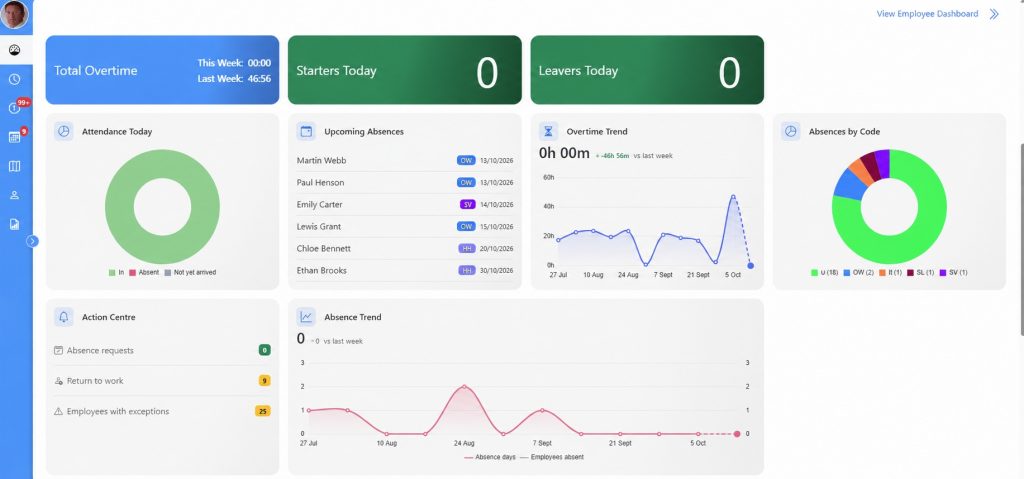
  • Real-time workforce dashboards.
  • Exception reporting.
  • Attendance trend analysis.
  • Labour cost visibility.

Streamlined Payroll Processing

  • Automated payroll preparation.
  • Clear audit trails.
  • Reduced payroll queries.
  • Reliable integration with payroll systems.

Workforce Compliance

  • Working Time Regulations monitoring.
  • Absence tracking.
  • Audit and reporting capabilities.
  • Accurate records for compliance purposes.

Enhanced Employee and Manager Self-Service

  • Electronic holiday requests.
  • Manager approvals.
  • Employee access to attendance records.
  • Mobile workforce capabilities where required.

Key Questions to Ask During a System Review

Whether reviewing your current supplier or considering alternative providers, consistency is essential. Every supplier should be evaluated against the same criteria.

Payroll Management

  • How are exceptions and anomalies identified and managed?
  • How are audit trails maintained?
  • How does the system reduce payroll administration?

Business Rules

  • Can the solution accommodate existing working rules and agreements?
  • How flexible is the configuration?
  • Can future changes be implemented without development work?

Hardware and Data Collection

  • What clocking methods are available?
  • Can existing hardware be retained?
  • What options exist for mobile or remote workers?

Integration

  • What integrations are available with Payroll, HR, ERP, Access Control, and Visitor Management systems?
  • Are integrations proven and supported?

Security and Hosting (for cloud based systems)

  • Where is data hosted?
  • What security standards are maintained?
  • What service levels and support arrangements are provided?

Implementation

  • What does the migration process involve?
  • How is data transferred and validated?
  • What support is available during and after implementation?

Commercial Considerations

  • What are the initial implementation costs?
  • What ongoing support and maintenance costs apply?
  • Are there any additional licensing or usage-based charges?

The Importance of a Structured Migration Process

For most organisations, the greatest risk during a replacement project is not the installation of new software. The primary challenge is ensuring that existing workforce rules, pay calculations, attendance policies, and operational processes are accurately replicated or improved.

A successful migration project should include:

  • Detailed Scope of Works.
  • Documentation of existing rules and processes.
  • Configuration review and approval.
  • Data migration planning – if available.
  • Payroll validation and parallel testing.
  • User and manager training.
  • Post-implementation support.

Organisations should seek clear documentation outlining how each stage of the migration will be managed.

Evaluating Long-Term Value

While software functionality remains important, organisations should also consider the broader value delivered by a workforce management solution.

Areas worth evaluating include:

  • Reduction in payroll administration.
  • Removal of manual calculations.
  • Improved labour cost control.
  • Enhanced workforce visibility.
  • Reduced manual processes.
  • Improved compliance reporting.
  • Increased management efficiency.
  • Scalability for future growth.

A workforce management platform should support operational objectives not only today, but also as the organisation evolves over the coming years.

Making an Informed Decision

Every organisation’s requirements are unique. The most effective procurement decisions are based on clearly documented business objectives, operational requirements, implementation considerations, support arrangements, and long-term value (ROI).

A structured review process allows organisations to assess whether their existing solution remains the best fit or whether alternative platforms may offer additional benefits more aligned with future business goals.

By taking a measured and evidence-based approach, organisations can ensure that any investment in workforce management technology delivers meaningful improvements in productivity, efficiency, accuracy, and visibility.

About Ceequel®

Ceequel® is a UK-developed workforce management platform designed to help organisations manage attendance, absence, labour costs, employee self-service, manager approvals, access control, visitor management, and workforce reporting through a single integrated solution.

Supporting organisations across manufacturing, logistics, food production, distribution, healthcare, engineering, and other sectors, Ceequel® provides flexible deployment options and configurable workforce management capabilities designed to meet the operational requirements of modern UK employers.

For organisations reviewing their current Time & Attendance solution, a structured demonstration and discovery process can help determine whether Ceequel® is aligned with their operational and workforce management objectives.


This article is intended for informational purposes only and does not make any representations regarding the performance, functionality, support, commercial arrangements, or future direction of any third-party software product or supplier. Organisations should undertake their own evaluation based on their individual business requirements and procurement processes.

Replacing Legacy Kronos Systems: A Practical Guide for UK Employers

Many organisations have relied on Kronos workforce management solutions for years, benefiting from robust time recording, scheduling, and workforce management capabilities. However, as technology, workforce expectations, and business requirements evolve, many employers are taking the opportunity to review whether their existing system continues to meet their operational needs and future objectives.

If your organisation is currently using a legacy Kronos solution and is considering its long-term strategy, this guide outlines the key factors that should be considered when evaluating your existing platform and assessing potential alternatives.

This article is intended as an educational resource to support informed decision-making and procurement best practice.

Why Organisations Review Legacy Workforce Management Systems

Workforce management systems often remain in place for many years. During that time, businesses can undergo significant changes that place new demands on technology and operational processes.

Common reasons organisations review their existing workforce management platform include:

  • Changes to payroll processes and compliance requirements.
  • Business growth, acquisitions, or multi-site expansion.
  • Increasing use of mobile, remote, or hybrid working.
  • A desire to improve management visibility and workforce analytics.
  • The need for greater automation and reduced administration.
  • Wider digital transformation programmes.
  • ERP, HR, or payroll system replacement projects.
  • Hardware refresh cycles or infrastructure modernisation initiatives.
  • Evolving employee expectations around self-service and accessibility.

A system review provides an opportunity to assess whether the existing platform remains aligned with current business objectives and future workforce management requirements.

What Modern Workforce Management Should Deliver

Today’s workforce management systems are expected to do far more than simply record attendance.

A modern solution should support strategic decision-making while improving operational efficiency across the organisation.

Accurate Time Recording

Organisations should expect:

  • Real-time attendance visibility.
  • Automated working time calculations.
  • Accurate overtime management.
  • Comprehensive absence monitoring.
  • Clear audit trails for payroll processing.

Improved Operational Visibility

Managers should have access to:

  • Live workforce dashboards.
  • Attendance exception reporting.
  • Labour utilisation data.
  • Departmental and site-level analytics.
  • Real-time workforce status information.

Payroll Efficiency

Effective workforce management should help organisations:

  • Reduce manual payroll administration.
  • Minimise payroll queries and adjustments.
  • Improve payroll accuracy.
  • Streamline payroll preparation processes.
  • Provide clear reporting and audit capabilities.

Employee and Manager Self-Service

Modern solutions increasingly support:

  • Holiday and absence requests.
  • Electronic approvals.
  • Mobile workforce access.
  • Employee attendance visibility.
  • Manager workflow automation.

Workforce Compliance

Employers should be able to monitor and report on:

  • Working Time Regulations.
  • Attendance policies.
  • Absence management.
  • Audit requirements.
  • Workforce governance procedures.

Key Areas to Assess During a System Review

When reviewing any workforce management platform, organisations should evaluate suppliers using consistent criteria.

Workforce Management Functionality

Consider whether the solution supports:

  • Complex shift patterns.
  • Overtime rules.
  • Attendance management.
  • Absence management.
  • Flexible working arrangements.
  • Multi-site operations.

Payroll Integration

Questions to consider include:

  • How is payroll data prepared and transferred?
  • What validation processes exist?
  • How are exceptions managed?
  • What audit capabilities are available?

Data Collection Methods

Review the available options for:

  • Biometric clocking.
  • Facial recognition.
  • Proximity cards and fobs.
  • Mobile workforce applications.
  • Web-based attendance recording.

Integration Capabilities

Organisations should understand how the platform shares data with:

  • Payroll systems.
  • HR software.
  • ERP platforms.
  • Access Control systems.
  • Visitor Management solutions.
  • Business intelligence and reporting tools.

Security and Infrastructure

Areas to evaluate include:

  • Data hosting arrangements.
  • Security standards and certifications.
  • Business continuity provisions.
  • Support and service level agreements.
  • Disaster recovery procedures.

Scalability

A workforce management platform should support:

  • Organisational growth.
  • Additional sites.
  • New departments.
  • Future technology requirements.
  • Evolving workforce practices.

Planning a Successful Migration

Any workforce management replacement project should be approached as a business transformation initiative rather than simply a software installation.

Successful projects typically include:

Discovery and Analysis

  • Review of existing workforce rules.
  • Documentation of attendance policies.
  • Identification of payroll requirements.
  • Review of reporting needs.

Configuration and Validation

  • Comprehensive Scope of Works.
  • Operational validation.
  • Payroll validation.
  • Rule verification.

Data Migration

  • Historical data requirements.
  • Employee information transfer.
  • Validation procedures.

Training and Adoption

  • Manager training.
  • Employee communication.
  • User documentation.
  • Ongoing support arrangements.

Go-Live and Post-Implementation Support

  • Controlled deployment.
  • Parallel payroll testing where appropriate.
  • Dedicated support during transition.
  • Performance monitoring.

Looking Beyond Features

When reviewing any workforce management solution, organisations should consider the wider business outcomes it can deliver.

These may include:

  • Reduced labour administration.
  • Improved payroll accuracy – no payroll leakage.
  • Greater workforce visibility.
  • Better labour cost control.
  • Improved operational efficiency.
  • Enhanced compliance reporting.
  • Increased employee engagement.
  • Better management decision-making.

The objective should be to identify a solution that supports both immediate operational needs and long-term organisational goals.

Future-Proofing Workforce Management

As workforce management technology continues to evolve, organisations increasingly seek platforms that can support a wider range of operational requirements from a single environment.

Areas commonly considered during strategic reviews include:

Bringing these functions together can help reduce administration, improve data accuracy, and provide a more unified view of the workforce.

About Ceequel®

Ceequel® is a UK-developed workforce management platform designed to help organisations manage attendance, absence, labour costs, employee self-service, manager approvals, access control, visitor management, and workforce reporting through a single integrated solution.

Used across manufacturing, food production, logistics, engineering, healthcare, distribution, and other sectors, Ceequel® provides organisations with configurable workforce management capabilities that can be tailored to specific operational requirements.

For organisations reviewing legacy workforce management platforms, a structured discovery and demonstration process can help determine whether Ceequel® aligns with their current and future workforce management objectives.


This article is provided for informational purposes only and does not make any representations regarding the performance, functionality, support arrangements, commercial terms, product lifecycle, or future direction of any third-party software product or supplier. Organisations should undertake their own independent evaluation based on their specific operational requirements, procurement processes, and business objectives.

Why a Dedicated Time & Attendance Platform with Integrated HR Functionality Often Delivers Better Workforce Management Than an HR System with Embedded Time & Attendance

In recent years, many organisations have sought to consolidate software platforms wherever possible. As a result, numerous HR systems now include embedded Time & Attendance functionality as part of a broader Human Resources offering.

While the concept of managing everything from a single platform may appear attractive, organisations whose workforce management requirements extend beyond basic absence recording often discover that there is a significant difference between a system that was designed around workforce management and later enhanced with HR capabilities, and a system that was designed around HR administration and later expanded to include Time & Attendance features.

The distinction is important because the priorities, complexity, and operational demands of workforce management are fundamentally different from those of HR administration.

Time & Attendance Is an Operational System

At its core, Time & Attendance is not simply about recording when someone arrives at work.

A modern Time & Attendance platform is responsible for:

  • Capturing attendance data in real time.
  • Calculating working hours.
  • Applying overtime rules.
  • Managing shift patterns.
  • Monitoring absence.
  • Supporting payroll preparation.
  • Providing labour cost visibility – including shop floor data.
  • Managing workforce compliance.
  • Delivering real-time operational intelligence.

For many organisations, particularly those operating in manufacturing, logistics, food production, engineering, healthcare, retail, and distribution, workforce management is an operational function that directly impacts productivity, labour costs, and profitability every single day.

An error in attendance processing can affect payroll immediately.

An error allocating labour to the wrong job can affect productivity immediately.

An error in workforce visibility can affect operational decision-making immediately.

HR Systems Are Primarily Employee Administration Platforms

Human Resources systems are typically designed to manage employee information and HR processes.

Common areas of focus include:

  • Employee records.
  • Recruitment.
  • Onboarding.
  • Performance management.
  • Learning and development.
  • Disciplinary procedures.
  • Employee documentation.
  • Policy management.
  • Succession planning.

These are critical business functions, but they are generally administrative rather than operational.

Most HR systems are designed to answer questions such as:

  • Who works for us?
  • What qualifications do they hold?
  • What training have they completed?
  • What policies apply to them?

Time & Attendance systems, by contrast, answer questions such as:

  • Who is currently on site?
  • Who is absent?
  • Who is working overtime?
  • What are today’s labour costs?
  • What exceptions require attention before payroll is processed?

While both disciplines involve employees, they serve very different purposes.

Workforce Management Is Often More Complex Than HR

Many organisations underestimate the complexity involved in accurately managing attendance and payroll-related calculations.

Examples include:

  • Multiple shift patterns.
  • Continental shifts.
  • Rotating rosters.
  • Overtime premiums.
  • Call-out payments.
  • Bank holiday rules.
  • Flexitime arrangements.
  • Annualised Hours.
  • TOIL (Banked Hours)
  • Attendance bonuses.
  • Break deductions.
  • Union agreements.
  • Site-specific working practices.

A dedicated Time & Attendance platform is typically designed from the outset to accommodate these operational requirements, effortlessly.

In contrast, organisations should carefully assess whether an embedded Time & Attendance module can fully support the complexity of their workforce rules both now and in the future.

Payroll Accuracy Depends on Workforce Accuracy

For many organisations, payroll represents one of the largest costs within the business.

The quality of payroll output is heavily dependent on the quality of attendance data entering the process.

A dedicated Time & Attendance platform is often built around:

  • Automated Rules Management.
  • Exception management.
  • Payroll validation.
  • Audit trails.
  • Labour cost reporting.

These functions help ensure that attendance data is accurate before it reaches payroll.

This is why many organisations view Time & Attendance as a critical operational control rather than simply an extension of HR administration.

Real-Time Visibility Matters

Operational managers often need access to information throughout the day, not simply at payroll processing time.

Examples include:

  • Who has not arrived for work?
  • Which departments are understaffed?
  • Who is currently on site and in the fire register?
  • Who is approaching overtime thresholds?
  • Which agency workers are present today – and their cost?

Dedicated workforce management platforms are typically designed to provide this information in real time.

This operational visibility can support:

  • Resource planning.
  • Production management.
  • Shift management.
  • Health and safety procedures.
  • Labour cost control.

Workforce Management Extends Beyond HR

Modern Time & Attendance platforms increasingly support a broader workforce ecosystem.

This may include:

  • Employee Self-Service.
  • Manager Self-Service.
  • Access Control.
  • Visitor Management.
  • Contractor Management.
  • Fire Registers.
  • Labour Analytics.
  • Workforce Reporting – Shop Floor Data Capture

These functions often sit closer to operations, facilities, production, and payroll than they do to traditional HR administration.

As a result, many organisations prefer a workforce management platform that can integrate HR functionality rather than relying solely on an HR platform to manage operational workforce processes.

Flexibility for Operational Change

Businesses rarely remain static.

New sites open.

Departments expand.

Shift patterns change.

Acquisitions occur.

Working practices evolve.

A workforce management platform should be capable of adapting to operational change without requiring extensive redevelopment or manual workarounds.

When evaluating any solution, organisations should consider how easily workforce rules, attendance policies, and operational processes can be modified as business requirements evolve.

The Ideal Approach: Integrated, Not Compromised

The discussion should not be viewed as HR versus Time & Attendance.

Both are essential.

The real question is where the organisation’s primary operational requirements sit.

For many employers, the most effective approach is a dedicated workforce management platform that incorporates HR functionality while maintaining the specialist attendance, payroll, labour management, and operational capabilities required to manage the workforce effectively.

This allows organisations to benefit from:

  • Comprehensive workforce management.
  • Integrated HR processes.
  • Accurate payroll preparation.
  • Real-time operational visibility.
  • Reduced administration.
  • Improved workforce intelligence.

Conclusion

Every organisation has different requirements, and there is no single solution that is right for every business.

However, where workforce management, payroll accuracy, labour cost control, operational visibility, continuous improvement, and complex attendance rules are business-critical, organisations should carefully evaluate whether an embedded Time & Attendance module can provide the same depth of functionality as a platform designed specifically for workforce management.

The most successful workforce management projects are typically those that place operational requirements, payroll accuracy, and workforce visibility at the centre of the decision-making process, while ensuring that HR functionality remains fully integrated and readily accessible across the organisation.


This article is intended for informational purposes only. It does not make claims regarding the capabilities, performance, or suitability of any specific software product. Organisations should assess all solutions against their own operational, payroll, HR, compliance, and workforce management requirements before making a procurement decision.

A Growing Mature Workforce and What to Do About It

The BBC reported recently on the RSPCA receiving an official warning from the Charity Commission.  The warning was issued after interim CEO Michael Ward received a 6 figure sum as a payoff; allegedly the result of challenging the recruitment process.

Michael Ward was appointed interim Chief Executive in June 2017; however he claimed he was a victim of age discrimination when a younger candidate was appointed to the role permanently.  He stated that he did not get the permanent post due to his age and the RSPCA subsequently paid out a sum well over his £150,000 salary.

How old is Michael Ward?

Michael is 57 years old.

Every day there appears to be something else reported in the media, whether that is social or economic, regarding an ever present, growing, ageing workforce.

Surely workers shouldn’t be made to feel that they have nothing else to offer within the workplace, once they have reached 50 and beyond?

Sadly, discrimination on the shop-floor and indeed the office isn’t new.  Workers from all sides of the social spectrum have experienced it.

From part-time workers, to new parents returning to work and finding their position isn’t the one they left behind when they embarked on their maternity/paternity leave.  Inexperienced adolescents on training schemes, or mature workers considered “too long in the tooth” for a real shot at promotion or leadership.

How times have changed.

Thirty years ago, had you decided to carry on working after the ages of 60 and 65 respectively, you would’ve been looked at incredulously.

Sadly in today’s economic climate that is not the case and unfortunately for the majority, it is not a choice.

Today the country has a serious issue right under its nose; a very real mature workforce and it is G R O W I N G!

The retirement age in the UK has risen considerably.  From next year the State Pension Age will increase again for both men and women, rising to 66 by October 2020.  Another increase by the Government is planned between 2026 and 2028, where it will then rise from 66 to 67 years.

State pensions saved hard for retirement, now not accessible until the worker is almost 70!

The pride and joy that is our NHS has certainly done its job well over the last 70 years but at the same time, it probably hasn’t helped.  With better and more accessible healthcare, the NHS has become a victim of its own success.

With improved standards of living and better employment rights, people are now quite easily reaching 90 and 100 years old, however, with no real structure in place to provide for this ageing population, the mature workforce has little or no option but to carry on working.

Workers in their 70’s or even 80’s are being reported as to still be “clocking in” via the national and local media.

So, what do we do about it and what methods are you putting into place to take care of the “Baby Boomer” and subsequent “Generation X” age groups?

With the onset of AI, you as an employer not only have a duty of care but a responsibility to re-train your mature workforce.  With remote and flexible working now becoming more and more mainstream, this is the most obvious option available, for ALL your employees.

With a more generational workforce in place, companies will have the benefit of both worlds; youth and vitality vs experience and wisdom.

With that information on board, if you haven’t looked at the options out there to cater for your employees, isn’t it time that you did?

ELF Productivity Ltd is at the forefront when it comes to managing your workforce successfully, effectively and efficiently.

CEEQUEL® Biometric Time and Attendance software suite is developed in-house by our team of highly skilled and experienced developers.  With software modules available for every possibility and a solution for EVERY Human Resource department issue, CEEQUEL® is the essential daily “tool “that your business needs.

Whether that need is the company incorporating a training matrix for an apprenticeship placement, performing a return to work interview for maternity/paternity leave or granting flexible working shift patterns and remote working, CEEQUEL® is THE collaborator that your company necessitates.

CEEQUEL® software is at the cutting edge in terms of originality, innovation and uniqueness.

Where others follow, CEEQUEL® leads.

If you are interested in implementing a real change in your company’s Time and Attendance processes, a change that benefits your ENTIRE workforce, download the brochure portfolio and contact the sales department today on 01257 256000, for a free no obligation quotation and demonstration of CEEQUEL® software.

I Think I Wanna Marry You

Booked yourself twice? Read our latest blog post on how to effectively and remotely manage more than one engagement….

“Get me to the Church on Time” ….

The marriage of Prince Harry to Meghan Markle is now just weeks away.  The nation’s, if not the world’s favourite Prince has found “The One” in Meghan and has decided, at the grand old age of 33, it’s now finally time to produce the “Band of Gold”  and “Kiss the Bride”.  The man of the moment is ready to settle down and experience both “Love AND Marriage”.

On Saturday 19th May 2018, all eyes will be on St George’s Chapel in Windsor, as Harry and his glamourous American fiancé say “I Do”.  This union will be cause for much celebration.  Ever since actress Grace Kelly married Prince Rainier of Monaco, the world has loved a good old fashioned “The Prince and The Showgirl” love story.

A  Royal Wedding bash or “knees-up” is something else, unless of course you are soccer fan.

In what has turned out to be the only real sting in this “fairy-tale”, the wedding of the year will clash with the ultimate football match …….the annual FA Cup Final!

HM Queen along with the rest of the Royal family, the movers and shakers of Hollywood will all be in attendance but what of Prince William; as President of the FA, where will he be spending his time?

If a new baby isn’t going to be enough for him to deal with, see previous blog post; The Pitter-Patter of Tiny Royal Feet, he now has to decide where to be on his little brother’s special day.

Football, Wedding, Football, Wedding……hmmm which do you choose?

Here at ELF Productivity Limited authors of CEEQUEL® Time and Attendance System, we have all the bases covered when it comes to remote working and flexible shift patterns.  No more worrying about getting to the office (or church) on time to “clock in”, it can all be done remotely via an Android, Apple or Windows device – you really can be in two places at once!

“Going to the Chapel” AND the match will not be an issue with ELF Productivity’s CEEQUEL® Mobile Apps and Employee Self Service software, as these applications have been designed with “on the go” employees in mind.  Every remote clocking is recorded in real-time; therefore giving you an instant and exact overview of your employees’ location.

But it doesn’t stop there. Employees have access to all their personal data whilst on the go, thus allowing for absence requests, such as holiday (or honeymoon) requirements, dentists, doctors and hospital appointments etc. CEEQUEL® Mobile Apps and Employee Self Service are just two of the modules that ELF Productivity’s Ceequel® software suite encompasses; our knowledge and expertise are unequalled.

With that in mind, is your Human Resources department in need of some “Time, Love and Tenderness this year?  Would you like ELF Productivity Limited to come alongside and become that “Perfect” partner for you?

If you would like to know more about the incomparable functionality of Ceequel® Software Suite, including our leading Time and Attendance modules; the downloadable catalogue of brochures can be found here.

Contact ELF Productivity today for a free no obligation quotation and demonstration of Ceequel® software.

Your company and ELF Productivity Limited the “Perfect” marriage.

Time & Attendance-Data Collection made easy by ELF Productivity

Elf Productivity Ltd understands the needs of every business and we thrive on helping you achieve your ideal set up. We listen to your business needs and use our industry expertise to help you choose the correct terminal for your working environment. We offer a wide variety of terminals that interact seamlessly with our time and attendance suite.

Time & Attendance System

Every working environment is different some more than others meaning the collection of your employees time and attendance data can be a difficult task to handle for many organisations.

Here at Elf Productivity we understand the needs of every business and provide our customers with a clocking terminal that suits their environment and requirements.  Each terminal has the capability to communicate in real time meaning your employees clocked status (in or out) is updated within Ceequel time and attendance in only a few seconds.  The way in which your employee’s clock in and out can be fulfilled by various methods and is often decided by the way in which your organisation works.

Terminals are capable of communicating with each other in many ways meaning all employee data is up-to-date and available to access from any location. The most common way in which terminals communicate is via TCP/IP it is possible however to set them up so that they can work via Wi-Fi , GPRS,VPN and also 3G n 4G networks.

Terminal types and industry

Elf productivity specialises in several different types of terminals. Each terminal can be customised to your working environment and set up with your chosen method of clocking.  Making sure your organisation has the correct terminal for your industry is of the up most importance to us. This is why we listen to your company needs and use our past experiences to suggest not only the most suitable terminals but also the most cost effective for your organisation.

Low cost terminals

Low cost terminals are ideal for companies within the office, clerical or admin profession who have simple clocking requirements. Elf’s iclock can be configured to display messages upon clocking or even be configured to display time and attendance data upon selecting a function key such as, number of remaining holidays, hours worked, overtime or flexi balance.

Mid-range terminals

Typically deployed in warehousing and distribution, these units are can also be utilised with hand held barcode readers for a low cost shop floor data capture solution. These hand held readers will help simplify the scanning of job sheets saving your shop floor managers time and money.


Touch screen industrial terminals

Touch screen data terminals utilise both Windows or Linux technology and are available with either a barcode, proximity or finger print reader. These terminals will allow your employees to access their personal records such as a graphical holiday screen, clock card times and also allows them to see who the first aider is within their department.

The main benefit of having a touch screen terminal is that it integrates well with shop floor data capture. Ceequel can be integrated with the vast majority of ERP systems allowing for live jobs and activities to be automatically uploaded in real-time, as well as select relevant operations and include information on quantity produced, scrapped and any downtime reasons. These terminals can also be used to view safety protocols ensuring all employees are up to date with current procedures and have accepted all changes to critical documents.

The front end screens on a touch screen terminal can be designed around your company’s individual requirements. This ensures that all data collected within your organisation can be streamlined in the relevant way.

Touch screen tablets

Elf’s software suite can be accessed of any device meaning it is possible for companies to set up industry standard tablets. This makes it possible for line managers to allocate jobs/activates and locations to their employees from out of the office and provides a way for employees to view their daily tasks without having to make numerous trips to the clock.

Biometric Terminals

The day and age of card based time and attendance is officially over and many companies have now chosen to implement biometric terminals in order to keep up with technology.  At ELF we provide a choice of Biometric options including fingerprint, vein, face or hand recognition.

Access control hardware

Here at elf productivity we sell a large range of access control hardware. All access control systems are IP based meaning all data and media can be quickly passed through to the Ceequel time & attendance suite. Access control systems can be accessible via proximity card, fob or fingerprint

If you’re looking to implement a simplistic time and attendance system that can increase the knowledge of your employees and ultimately save money – contact us today!

Access Control should be your Number One Priority

Access Control is a vital part of any organisation. If a business doesn’t have an access control system in place then potentially your property and sensitive information is at risk. Securing your sensitive data decreases this risk and also protects your employees and visitors.

Access control is one of the biggest buzz words in business right now, and for good reason. Why, you ask? Well, you wouldn’t give the brand new cashier the combination to the CEO’s personal safe, would you? Of course not, because the cashier doesn’t need that kind of access to do his or her job. The reality, though, is that when your business runs on an unsecured network where there aren’t enough safety measures taken there is nothing to stop employees on the shop floor from getting access to information they don’t need, and probably shouldn’t have. Performance reviews, personal information, company meeting minutes, client information, and so on, are all at risk.

The fewer people who have access to sensitive data, the smaller the chances are that someone may mess it up. And if something does happen, there’s a very small pool to draw from regarding who is responsible for it.

Access Control For The Modern Business

Just because you’re not a computer wizard, that doesn’t mean you can’t put reasonable, simple controls on your business’ network. Elf Productivity Ltd. has designed a simple software suite that lets anyone maintain their controls, keeping sensitive information in a place where only those who need it can get to it. In addition to access control features, though, this software also comes with a built-in time clock, employee self-service features, and it’s user-friendly. It’s meant to work with any business at any level, so regardless of whether you’re a sprawling multi-national corporation, or just a local store hoping to expand, this software will help you achieve your goals.

If you’d like more information on how Elf Productivity Ltd. can help your business achieve more, then simply contact us to find out about all the options we offer you.

Accurate Time and Attendance: Never Experience A Problem Again

Recording your individual employees accurate working hours on a day to day basis is often a difficult task. The information recorded has to be precise in order to avoid paying your employees the wrong amount. A simplistic way to record this data is through the implementation of a time and attendance system.

Paying workers for their time on the clock is a tradition that’s gone on for generations. While the system is fine in theory, there have always been problems presented by the time clock. Perhaps the biggest is creating a simple system that everyone can use, and which doesn’t take five minutes for the previous shift to clock out, and another five minutes for the next shift to clock in.

In order to make sure every worker gets paid for their time accurately, Elf Productivity Ltd. created a better system.

The Future of Time and Attendance

What Elf Productivity Ltd. did was create a digital time clock that every employee can access with ease from any device that’s signed into your company’s network. There’s no need to stand in a back hallway in a single file line, because everyone can sign in using their employee identification numbers and passwords. Everyone can do it at 9 on the dot if that’s when the shift starts, and work can get started immediately.

Even better, if there are mistakes in the amount of time someone worked (say that they forgot to clock out, or had computer issues and couldn’t clock in), then those mistakes can be fixed with a few strokes of a keyboard. There’s no need to get a new paper time card and re-punch it, or to make a mark with a pen showing the time you really clocked in or out. As far as your business is concerned actual, physical time cards should be as relevant to your day-to-day operations as stone tablets thanks to Elf Productivity Ltd.

For more information on how our fully integrated software suite can help make your business more efficient, simply contact us today!

The Access Control of the Future

Choosing the right method to keep your information secure can be a difficult task for any organisation and with so many to choose from the task can often seem like an impossible one. Not securing your data however is out of the question as unsecured data can be accessed by anyone, thus increasing the risk of sensitive information landing in the wrong hands.

Access control is one of the oldest business practices known to mankind. The earliest developments involved guards and bars, but as technology advanced we invented everything from lock boxes to secret panels. In today’s digital world, we have access to more methods of access control than ever before, but the sheer variety of options can sometimes seem like a burden. After all, how do you choose the right lock to keep your business safe?

Flexible Digital Access Control

This is a question that Elf Productivity Ltd. has pondered over quite a bit, and the answer it created is both simple, and elegant. That answer is a software suite that integrates every function a business needs to get through the day, but which is simple enough that even those who don’t consider themselves tech savvy can use with little instruction.

So what does it do? Well, a little of everything. This particular software suite has an integrated time clock, for example, and it also provides different levels of accessibility depending on an individual’s clearance. A standard employee can sign into his or her account, clock in, and access all of the programs needed to do the day’s work. Employees can even access their personal information, changing it as needed in the event that they have a name change, move, or make any other alterations. At the same time, though, the system makes sure that only people with clearance can access employee write-ups, look at work history, or gain access to financial data.

In short, the software provides a flexible system that will handle anything your business can throw at it, while at the same time making sure you can lock any digital doors you need to. For more information on this software suite, and how it can help your business, simply contact us today!

Employee Self Service saves Time, Money, and Frustration

Your businesses Human Resources department often wastes a significant amount of time each month updating individual employee information. Not only is this time better spent elsewhere, it is also costing your business money. By implementing an employee self service system you can transfer the task of updating employee data over to your employees.

We’ve all heard the old saw about how the Human Resources Department moves as fast as an arthritic tortoise in a school zone. You got a new apartment last month, you got married, you opened a different bank account, and even though you submitted the forms as required, it still took more than a month for HR to get around to correcting your details. Maybe you missed a pay cheque, had an important work correspondence sent to the wrong address, or you just had the wrong name on your taxes, but while details change, the story stays the same; if there was a faster way to alter your personal information, neither you nor your company would be inconvenienced.

Fortunately there is a way you can sidestep HR entirely, it’s called Employee Self Service.

How Does Employee Self Service Work?

The concept is pretty simple: under a more traditional system you would fill out a form detailing your personal information changes, along with any necessary proofs, and you’d give those forms to the HR department. HR’s personnel would put those forms on a big stack, and eventually work its way to making your updates. This might take days if you’re lucky, weeks on average, or more than a month if there’s a big backup of work.

Employee Self Service, on the other hand, allows you to skip the middle man. You simply log into your business’ network, go to your profile, and change the information to reflect what it is now, you save the change, and then go back to doing your job.

It’s That Simple?

It is, actually. While there are still a lot of tasks that require HR personnel, technology has put the power to control personal information into the hands of employees. The changes can be done in mere moments, ensuring that all information is current and up-to-date without getting bogged down in an inbox somewhere.

For more information on Employee Self Service, and how it can change the way you do business, simply contact us today!